
Bands
Band step-up
A TrainAI movement demonstration with equipment and setup cues.
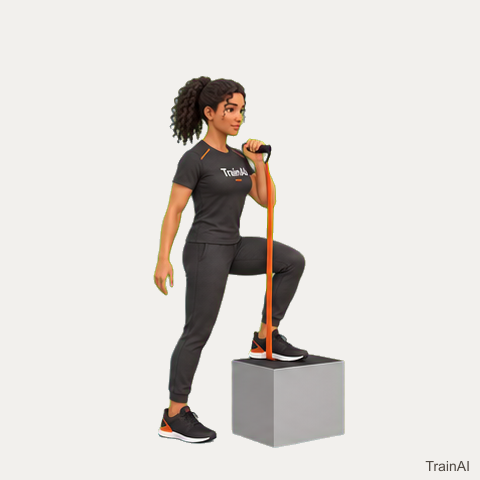
How to do band step-up
quadsRepetitionshome · gym
Equipment
band, stable step
- Place one foot fully on a stable low step, securing a long resistance band beneath that foot. Hold the band handle near the shoulder on that side.
- Brace your trunk and press through the foot on the step to lift your body. Keep the knee aligned with the foot.
- Finish standing tall on the step without forcing the working knee past straight. Use the other leg only as needed for balance.
- Lower the trailing foot back to the floor slowly while keeping the leading foot and band secure. Complete your repetitions, then change sides.
Choose a comfortable range and use secure equipment. The illustration is a movement reference; stop if a movement causes pain.
Use this demonstration
480 × 480 pixels · 6 animation frames · Native size, no upscaling.


TrainAI branding is included. Browse all downloads or use the JSON catalog.